Sven
“My job is to manage Safeguard's online communication. In addition to the site, I also provide the social media channels with content. This means that I create and post articles, interviews and videos. Both the subject matter and the form vary, but are essentially focused on industrial safety.”

Emergency Response QR Alert Sign
Emergency Response QR Alert Sign
Blog
5 min
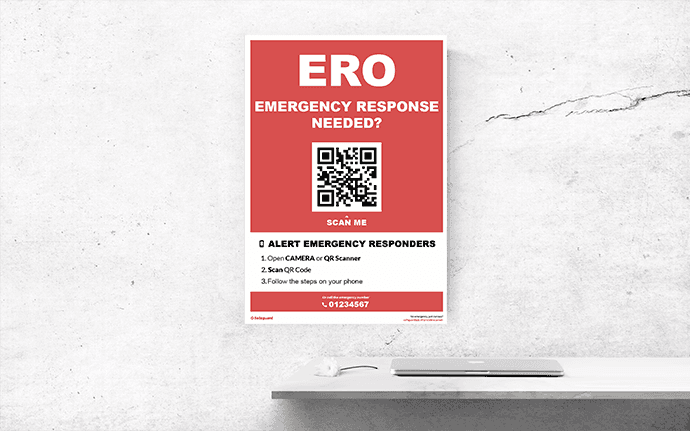
In the event of an emergency, it is important that the right help is on site as quickly as possible. Via the ERO QR Alert Sign it is possible, as an employee, to immediately call up the emergency responders present in a quick and simple manner.
How does this work for me as an employee?
How does this work for me as an emergency response officer?
How does this work for me as an employee?
In the event of an emergency, it is possible to immediately call in the emergency response team. It goes like this:
Scan the QR Code
You can use the Camera app on your phone or a QR code scanner app for this.Confirm that you want to make a call to the emergency response officers.
When you confirm this, a call will be made sent to the emergency response officers. The phones go off, and they see where the call is being made from. This information is preset for the QR call sign.The emergency response officers on location have been called.
Stay with the victim and wait for help to arrive. Is this taking too long and is it an emergency? Then call the emergency number.
Optional
It is possible that your organization has access to the Safeguard Push To Talk module. If this is the case, you will be automatically connected to the Push to Talk channel of the emergency response team. This communication allows you to communicate directly with the care providers. This provides more clarity and faster action.
If you don't get into a conversation, you'll see a different screen. Taking too long? Call the emergency number.
How does this work for me as an emergency response officer?
When a call is made using the ERO QR alert sign, you will receive a call as a present ERO. The call contains preset information about the location of the call sign (for example: cafeteria, 2nd floor).
Nothing else changes for you as an emergency response officer. The call comes in the same as a call you are used to while training.
Optional
If your organization has the Safeguard Push to Talk functionality, you will receive even more information. The employee who scans the QR Code, and thus sends the call, is added to the Push to Talk conversation of the emergency response organization. This allows you to immediately provide verbal assistance to the employee on site, in addition to asking for additional information about the victim.
Questions about our emergency response app?
Do you have questions about the Safeguard app? Or do you want more information? Please contact us. We can be reached in several ways. You can use the contact form on our website. You can also contact us by phone or e-mail. We are happy to help you.

